Software
Test Automation
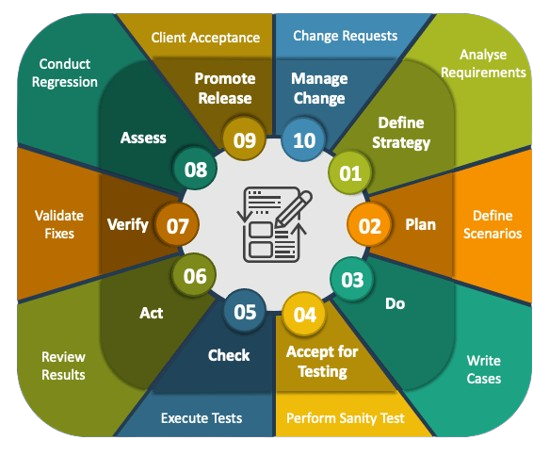
Software Testing Life Cycle

What is Software Test Automation?
Automated testing is a software testing technique that automates the process of validating the functionality of software and ensures it meets requirements before being released into production. With automated testing, an organization can run specific software tests at a faster pace without human testers.
Why automate testing?
Implementing test automation brings numerous advantages that enhance software quality, efficiency, and reliability. By reducing manual effort and increasing test coverage, automation helps teams deliver robust applications faster. Below are some key benifits of adopting test automation in the development process.
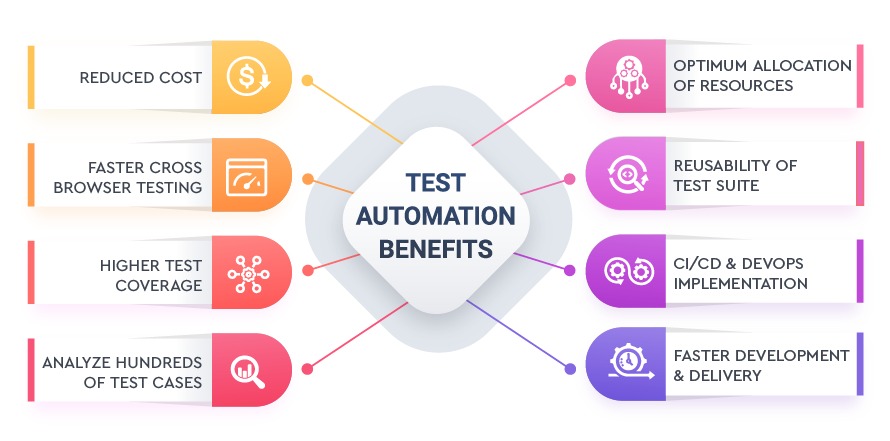
- Efficiency- Automated tests execute faster than manual tests, saving time
- Accuracy - Reduces human errors and ensures consistent test execution.
- Scalability - Allows testing of multiple scenarios across different browsers and devices.
- Cost-Effectiveness - Allows testing of multiple scenarios across different browsers and devices.
- Continuous Integration - Supports DevOps and CI/CD pipelines for rapid deployment.
Key Areas of Test Automation
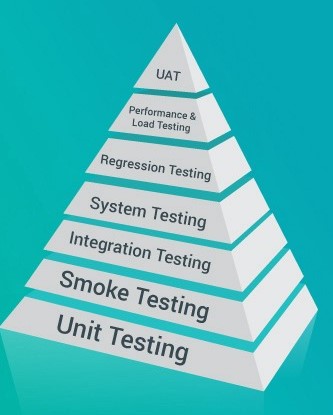
- Functional testing ensures that a software application works as expected by validating its features against specified requirements. It focuses on user interactions like form submissions, authentication, and navigation flows. This testing can be manual or automated.
- With ,UI Test Automation user interactions can be efficiently tested by automating clicks, form inputs, and validations, reducing manual effort. Similarly, API test automation ensures that backend services function correctly by validating request-response flows.
The types of functional testing are as follows:
- Integration - Tests individual components or functions in isolation to ensure they work correctly. It helps catch bugs early and improves code reliability.
- Integration Testing - Verifies that different modules or components work together as expected, ensuring seamless data flow between them.
- Regression Testing - Ensures new changes don't break existing functionality by re-executing test cases after updates or bug fixes.
- Smoke Testing - A quick, high-level test to check whether the basic features of an application work before deeper testing begins.
- Acceptance Testing - Validates whether the software meets business requirements and is ready for release, often performed by end users or stakeholders.
Non-Functional testing ensures that a system meets quality standards by evaluating its behavior under different conditions. It focuses on aspects like reliability, efficiency, and user experience rather than specific functionalities.
The types of non-functional testing are as follows:
- Security Testing - Identifies vulnerabilities and ensures the application is protected against threats
- Usability Testing - Assesses the application's ease of use and overall user experience.
- Performance Testing - Measures system responsiveness, stability, and scalability under different workloads.
Implementation Approach
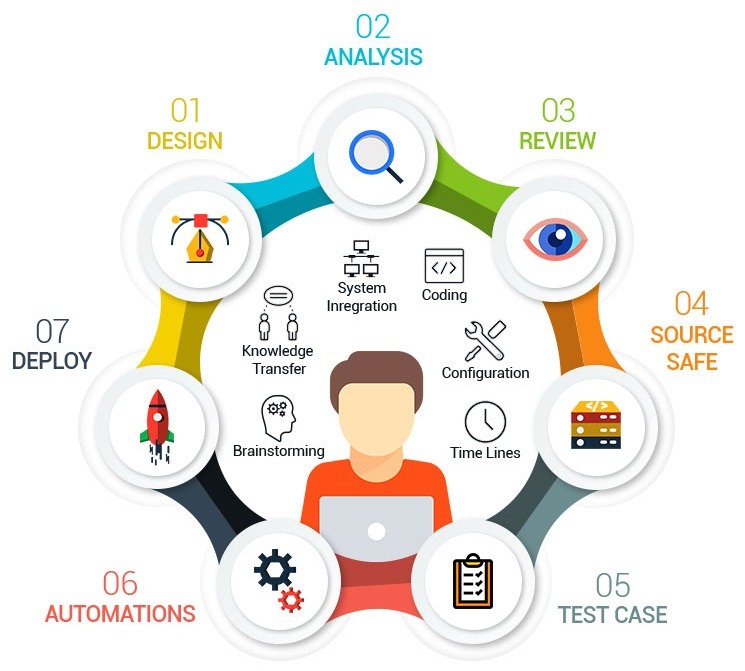
- Define Test Strategy - Design and define a clear test strategy by identifying key test cases to automate, focusing on critical functionalities. Proper planning ensures efficient automation and reduces manual effort.
- Analyze and select tools - Select the best automation tools based on project requirements. Evaluate tools that align with the technology stack and support CI/CD integration to enhance test execution.
- Review - Develop reusable and maintainable test scripts. Ensure scripts follow a modular approach, making them easy to update as the application evolves while improving scalability.
- Source Safe - Implement version control and structured test data management. Storing test scripts securely and maintaining reliable test data ensures consistency and collaboration.
- Test Case - Execute automated test cases and analyze reports to validate functionality. Early defect detection helps maintain software stability and improves quality assurance.
- Automations - Integrate automated tests with CI/CD pipelines to enable continuous testing and rapid feedback. Automation accelerates the deployment process and ensures smooth releases.
- Deploy - Regularly monitor and update test scripts to align with application changes. Optimize test coverage and ensure long-term efficiency by refining automation strategies.